How to Scout Next Week's Opponent From Game Film
Useful opponent scouting starts with the right questions, both teams' numbers, and film you can actually search. Here is how coaches can use Playtics to prepare without spending the night counting.
Most staffs already know they should scout the next opponent. The harder problem is doing it in time.
A coach can watch an entire game and still leave the film room with only a few impressions: they like to pick-and-roll, they shoot from the corners, they press after made baskets. Those notes can be true and still be incomplete. Scouting becomes useful when the staff can answer a smaller set of questions, then open the possessions that prove the answer.
That is where Playtics helps. It does not replace the coach's judgment. It removes the mechanical work of counting, searching, and assembling a record so the staff can spend the limited hours on the plan.
Start with questions, not a full rewatch
A useful scouting session is not a second viewing of the whole game. It is a search for a few decisions the players can actually carry into Friday night.
Before anyone presses play, write down the questions that would change practice:
- Who creates the opponent's offense, and who finishes it?
- Where do they prefer to shoot, and where do they settle?
- How do they get extra possessions: offensive rebounds, steals, or live-ball turnovers?
- Which bench players change the game?
- What happens when they miss, and what happens when they score?
- Which of our coverages, lineups, or matchups already struggled against this style?
If the staff cannot name those questions, the film session usually turns into note-taking. If the questions are clear, the film becomes evidence.
Use two sources: the last time you played them, and a recent game they played
Opponent information comes from two different kinds of film.
Your last game against them shows how that team performed against you. That record already includes their box score, their shot locations, and the possessions that decided the matchup. We wrote about that half of the work in Why Coaches Need the Opponent's Box Score Too.
A recent game they played against someone else shows more of their usual habits: who they go to early, which zones they hunt, and which players stay on the floor when the score moves.
One game is not a season. A complete scouting packet still needs a coach's interpretation, more than one look when film is available, and a decision about what this particular roster can take away. The point of the breakdown is to make those looks faster.
What Playtics gives you from one uploaded game
If you already film games, you already have the raw material. Upload that recording — your own game, or a recent opponent game you have permission to use — and Playtics returns a breakdown in a few hours:
- A player-by-player box score for both teams
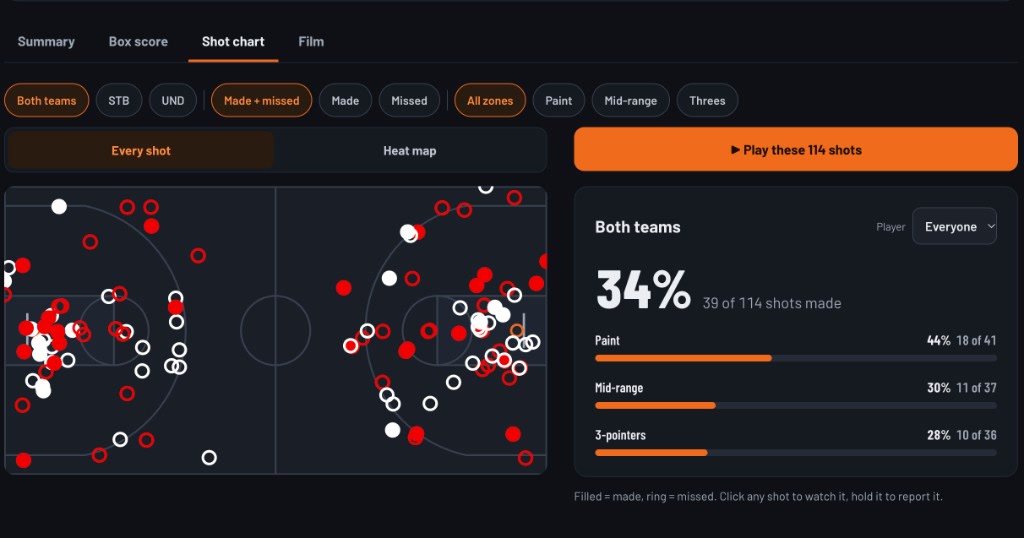
- Shot locations by zone, with a filter for paint, mid-range, and threes
- Automatic game insights, including the stretches and areas that decided the result
- A team comparison and a team profile against the opponent
- Film cut by play, with filters for player, play type, and quarter
- Highlights for each player, each team, and the full game
Nothing extra has to be installed in the gym. The same camera you already use is enough.
That last point matters for scouting. Coaches can upload another team's game when they have the film. Each upload counts as one game. The return should look like a usable record, not a pile of unlabeled video.
Start on the summary, then jump to the clips
The summary page is the fastest first pass. What won it cards point to a run, a shot area, a hot player, or ball movement — and each card opens the baskets behind it. The team comparison sits underneath: points, field-goal rate, threes, twos, free throws, rebounds, and offensive rebounds. Top performers sit beside that, so the staff can open a player card without hunting through the full box score.
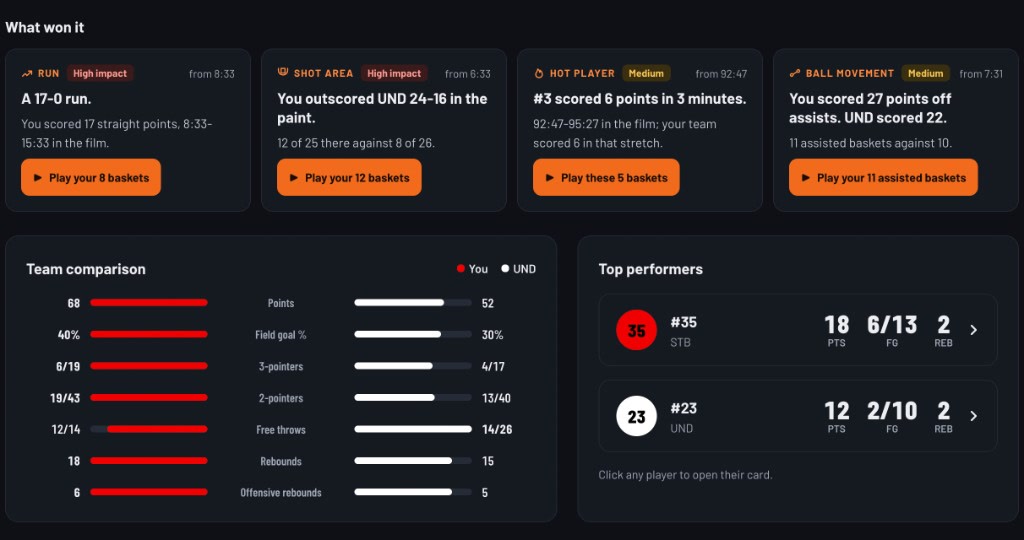
These cards are not the scouting report. They are the shortest path into the film. If the opponent won a stretch in the paint, play those baskets. If one player scored the run, open that player's clips next.
The team profile makes the same comparison in one picture: shooting, threes, free throws, rebounding, and defense against the opponent average.
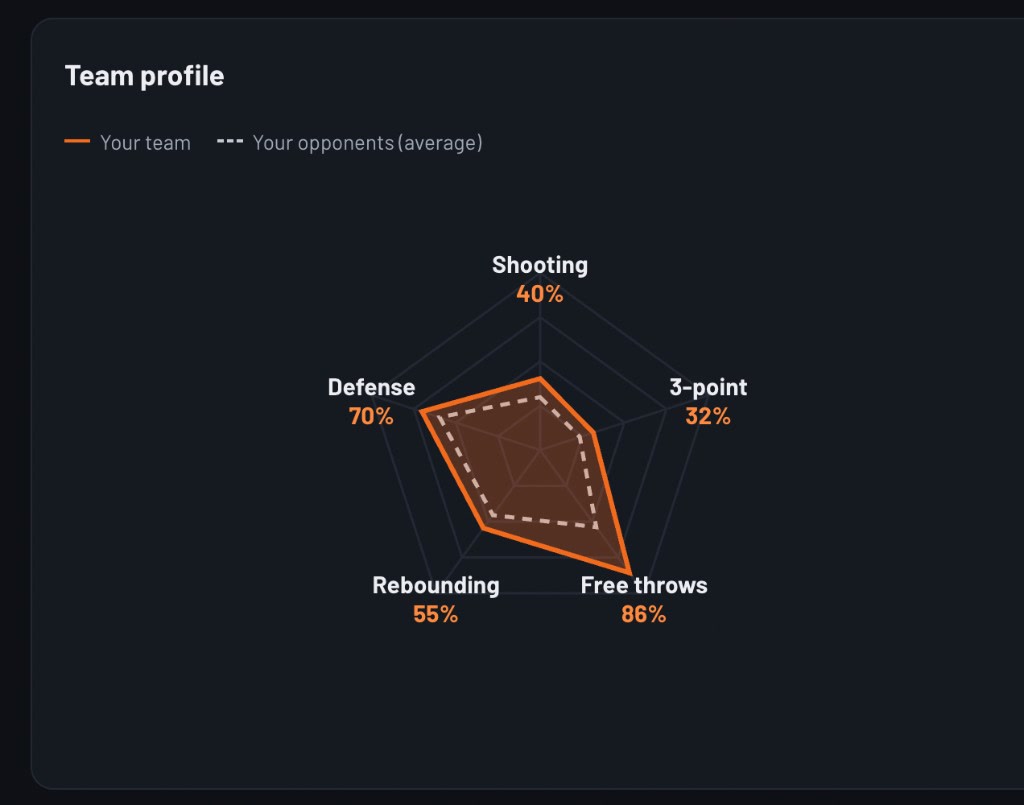
Use it to decide what the next game is actually about. If the gap is rebounding, the teaching list should start on the glass. If the gap is threes, the staff should spend the next ten minutes on closeouts and who they leave in the corner.
Read the opponent's box score as a map, not a verdict
After the summary, open the opponent's player-by-player box score and mark four things:
- Primary scorers. Who carried the points, and were those points efficient or high-volume?
- Creators. Who collected assists, and who got to the line?
- Extra possessions. Who rebounded on the offensive glass, forced steals, or lived in transition?
- Bench change. Which reserves produced enough to deserve a clip list of their own?
These numbers do not tell the staff what coverage to teach. They tell the staff whose possessions to open first.
If one guard created half the team's assists, start there. If a reserve changed the rebounding battle, find that stretch. If the opponent reached the line repeatedly, look at who was fouling and when.
The box score is an index. The film is the explanation.
Let the shot chart choose the next clips
A shot map answers a different question: where did the opponent actually live?
In Playtics, the shot chart can show both teams or one team, made shots, missed shots, or both. Filter to the paint, mid-range, or threes. Click any shot to watch it. If a zone looks important, play every shot from that zone instead of scrubbing the full game.
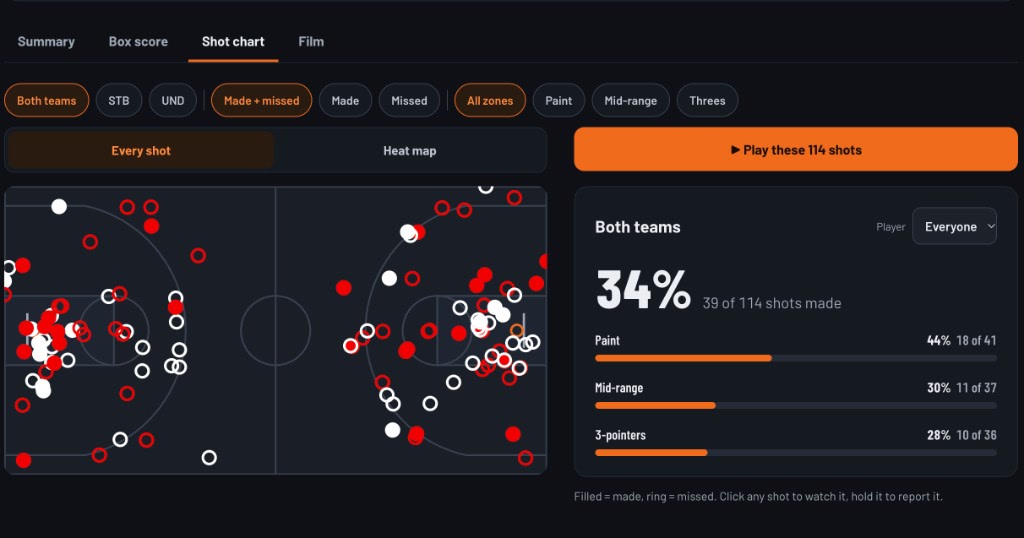
Look for clusters, not isolated makes.
- Repeated attempts at the rim usually mean they are getting downhill or offensive rebounds.
- A thick corner-three profile may change how you close out and who you hide in the corner.
- A lot of midrange pull-ups can be a preference — or a sign that they were kept out of the paint.
The map should send the staff back to film with a location in mind. Filter to those shooters, then watch how the shot was created: early offense, a second side, an offensive rebound, or a late-clock isolation.
Search the film instead of scrubbing it
Once the numbers point to a few players and a few zones, the film tab should do the retrieval work.
Playtics cuts the game into a play list. Staff can filter by player, play type, or quarter, then move through possessions at 0.5×, 1×, or 2×. That is the difference between scouting and rewatching.
A practical sequence looks like this:
- Open the What won it card that names the run or the shot area, and play those baskets first.
- Filter the shot chart to the opponent and the zone that showed up.
- Open the missed shots around the basket and check how often they stay for the offensive rebound.
- Jump to the quarter where the score changed and watch which players were on the floor.
The staff is still doing basketball work. They are just no longer spending the first hour finding the possessions.
Keep the teaching package small
Players do not need the whole scouting report. They need a few pictures they can remember.
After the staff has answers, cut the shareable part down:
- Two or three clips of the opponent's main action
- One clip of the player who has to be found on the glass or in transition
- One clip of the coverage you want your team to repeat
- The opponent's team highlight only if it shows the pace and spacing, not as a substitute for teaching
Playtics already organizes highlights per player, per team, and per game. Use that split. The team reel is for the room. The player reel is for the matchup. The game reel is for context.
If something in the record looks wrong, edit it or ask the Playtics staff to fix it before the clips go to players.
A simple week-of-game workflow
Here is a scouting week that fits a staff with limited time.
Monday. If you have film of next week's opponent, upload it. If you already played them, reopen that game first. Write the five questions that would change practice.
Tuesday. When the breakdown is ready, take 20 minutes on the summary, both box scores, and both shot maps. Circle the players, zones, and extra-possession sources that matter.
Wednesday. Spend the film session only on those clips. Build a short teaching list. Decide the one coverage, the one matchup, and the one rebounding or transition rule you will emphasize.
Thursday. Share the small clip package with the team. Keep the written notes shorter than the video. The players should leave knowing who to find, where to help, and what the first possession after a make or a miss should look like.
The exact days can move. The order should not. Questions first, record second, film third, teaching last.
What Playtics does not do for you
Honesty makes the tool more useful.
Playtics will not write a finished tactical scouting report. It will not label every set by name, and it will not decide which detail this particular team is ready to hear. Those remain coaching jobs.
What it does do is put both teams' numbers, shot locations, insights, and searchable film in one place, usually a few hours after upload. The staff still has to separate a repeated habit from one hot shooting night. The software should make that judgment cheaper to reach.
Scout the opponent as a matchup, not a highlight tape
The goal of scouting is not to admire the other team. It is to decide how your team will play them.
That decision is easier when the record includes both sides, the shots have locations, and the film can be filtered instead of scrubbed. Upload the game you already have. Open the opponent's production. Find the possessions that answer the questions you wrote down. Then teach only what the team can use.
Want to see how a real opponent game looks after Playtics breaks it down? Book a demo or tell us about your team.